Retail Management Software for Nigerian Businesses
InkeepX is retail management software that runs your whole shop from one system. Sell at the till, keep stock accurate, control what each staff member can do, track customers who buy on credit and see every branch’s performance from your phone, in Naira.
Free plan available. No credit card needed to sign up.
- 8:02Register opened by BisiOpening float recordedSales
- 11:40Low stock: noodles, cartonBelow minimum, flagged for reorderStock
- 13:15Credit sale to Mr OkonAdded to his customer balanceCustomers
- 16:05Online order for pickupPaid with Paystack, same shop stockOnline
- 19:30Register closed and cashed upOwner reviews the day from homeReports
Running a shop shouldn’t mean being in it every hour
Most retail owners in Nigeria juggle a sales book, a stock book, a debtors list, a few WhatsApp groups and a lot of trust. It works until the business grows.
You can’t tell how the day went until you get to the shopSales, cash and stock only make sense once someone tallies them, usually late and by hand.
Customers owe you, but you can’t remember how muchCredit sales live in a notebook or someone’s memory, so balances get disputed or forgotten.
Every staff member can do everythingWithout access control, anyone can give discounts, adjust stock or see figures you would rather keep private.
Sales are high but profit is a guessYou know what came in today, not what each product earned after cost, or which items are wasting shelf space.
Your tools don’t talk to each otherOne app for sales, a spreadsheet for stock, Instagram for online orders. Nothing adds up without re-entering it.
A second branch doubles the headacheTwo shops means two sets of books, two teams to supervise and stock you can’t see from where you are.
One connected system for your whole retail business
Each part of InkeepX feeds the others. A sale at the till updates stock, the customer’s history, the cashier’s figures and your reports at the same time.
Selling
- Fast checkout with product search and barcode scanning
- Cash, transfer, Paystack and split payments
- Discounts, tax, returns and refunds
- Branded receipts, invoices and waybills
- Register opening and cash-up
Stock
- Real-time quantities as you sell and receive
- Low-stock alerts and reorder visibility
- Sizes, colours and units like pack or carton
- Purchase orders and supplier records
- Counts and stock reconciliation
Staff
- Separate accounts for cashiers and managers
- Permissions for discounts, stock and reports
- Sales by staff member
- Login and activity records
- Staff assigned to specific branches
Customers
- Customer records and purchase history
- Credit sales and outstanding balances
- Debt reports and payment records
- Customer wallet for overpayments
- Loyalty and rewards
Branches and online
- Several stores and warehouses in one account
- Stock requests and transfers between branches
- An online store that shares your shop’s stock
- Pickup or pay-on-delivery online orders
- Branch comparison reports
Reports and AI
- Daily, weekly and monthly sales
- Gross and net profit information
- Best sellers and slow movers
- Inventory value and purchase reports
- Ask InkeepX AI questions in plain language
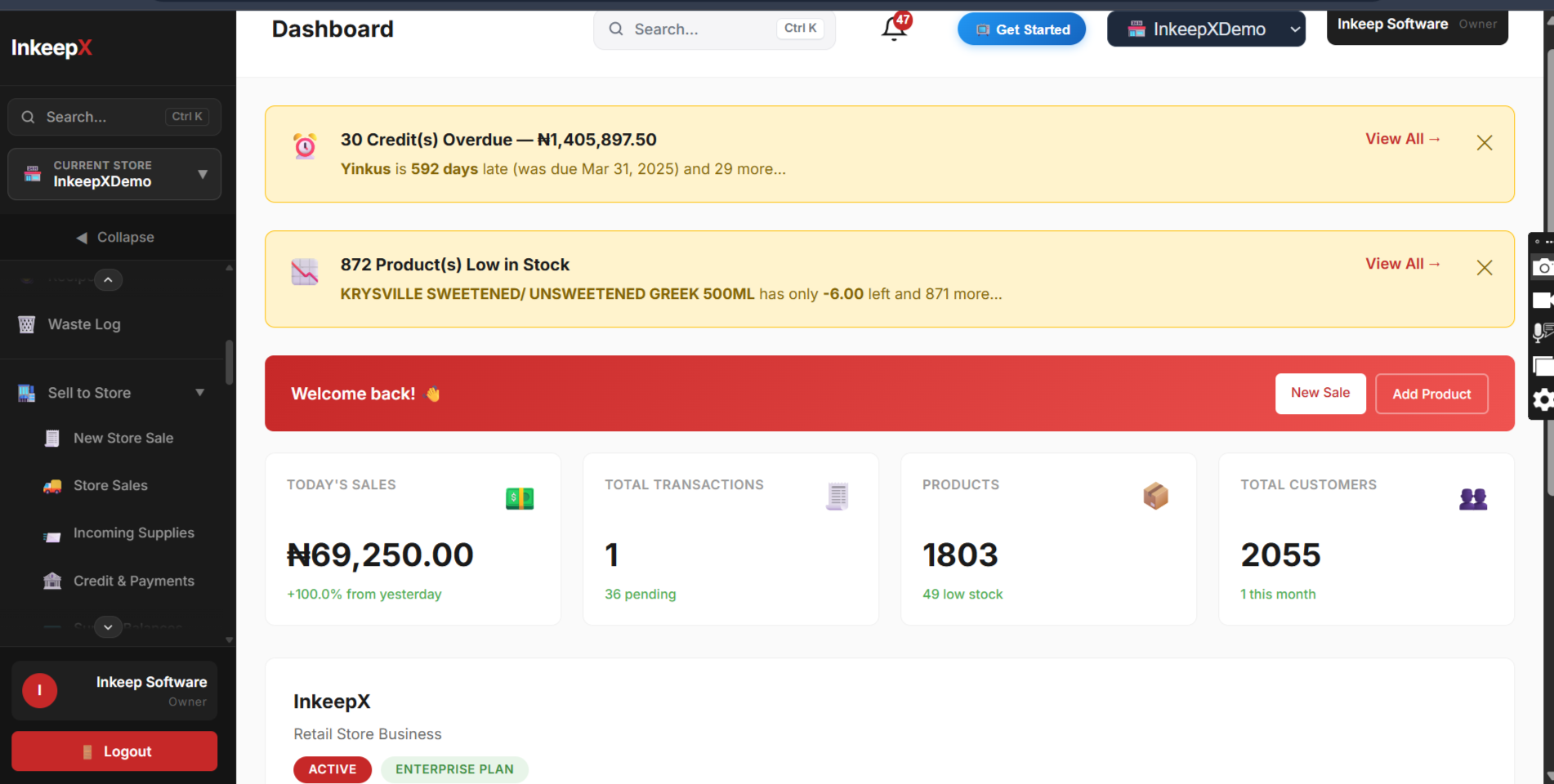
Know what is happening in your shop from anywhere
Whether you are at the market buying stock, at another branch or at home, InkeepX shows you the shop as it is right now.
- Today’s sales so farBy branch, by payment method and by cashier.
- What needs restockingProducts below their minimum level, before shelves go empty.
- Who owes youCustomer balances and recent payments in one list.
- What your staff didSales, discounts and stock changes linked to each account.
- How each branch comparesSales and profit side by side, without phoning anyone.
Start with one shop. Grow without switching systems.
The setup you start with keeps working as the business expands.
Sign up and add products
Create a free account and import your product list from Excel or a CSV file.
Start selling
Sell from a phone, tablet or computer. Stock updates with every receipt.
Add your staff
Give cashiers their own logins with only the permissions they need.
Track customers and credit
Record who buys on credit, follow up balances and reward repeat buyers.
Open another branch
Add a store, assign staff and move stock between locations from the same account.
Sell online too
Turn on the online store and take orders from the same stock as your shops.
Separate tools or one retail system?
Many shops already use some software. The trouble starts when sales, stock and customers live in different places.
| Task | Books, Excel and separate apps | InkeepX |
|---|---|---|
| Record a sale | Sale recorded in one place, stock updated later in another | One receipt updates sales, stock, customer and staff records |
| End-of-day cash | Counted against a handwritten total | Cash-up against the register’s recorded sales |
| Customer credit | Notebook or memory | Balances, payments and debt reports per customer |
| Staff control | Shared logins or none | Individual accounts with permissions |
| Online orders | Taken on social media, stock adjusted by hand | Online store drawing from the same inventory |
| A new branch | Another set of books | Another store in the same account |
Built for the way Nigerian retailers sell
Light or network gone? Keep selling. The InkeepX offline desktop POS records supported sales without internet and syncs them when you are back online. Remote dashboards and online services need a connection.
Download the offline app“I can monitor my sales record, inventory, purchases and staff sales from anywhere seamlessly. I also love the feature where my staff can be allowed to access the app as well to make sales.”
Questions about retail management software
What is retail management software?
Retail management software is one system for running a shop. It records sales at the till, keeps stock up to date, controls what staff can do, tracks customers and credit, and turns it all into reports, across one store or many.
What is the difference between POS software and retail management software?
POS software handles checkout: ringing up items, taking payment and printing receipts. Retail management software includes the POS and connects it to inventory, purchases, suppliers, staff, customers, branches and reporting, so every sale updates the rest of the business.
Is InkeepX suitable for a small shop?
Yes. You can start on the free plan with one store and move to a paid plan when you need more products, staff accounts or branches. It runs in a browser, on Android and on Windows.
Can I manage several retail branches with InkeepX?
Yes. Each branch has its own sales, stock and staff, and you can switch between them, move stock between locations and compare branches in consolidated reports from one account.
Can my staff use InkeepX without seeing everything?
Yes. Roles and permissions let you decide what each person can do. A cashier can sell without seeing profit reports or adjusting stock, and every sale is linked to the staff member who made it.
Can I sell on credit and track who owes me?
Yes. Record credit sales against a customer, see outstanding balances and debt reports, and record payments as they come in. Overpayments can be kept as a customer wallet balance.
Can I sell online and in my shop from the same stock?
Yes. InkeepX includes an online store connected to your inventory, so online orders and in-store sales draw from the same stock records.
Does InkeepX work without internet?
The InkeepX offline desktop POS keeps recording supported sales when the internet is down and syncs them to the cloud when the connection returns. Remote dashboards and online services need internet access.
What hardware do I need to run InkeepX in my shop?
You can start with a phone, tablet, laptop or desktop computer. Compatible receipt printers, barcode scanners and cash drawers can be added. InkeepX can also supply complete counter setups, so message the team to confirm current options and device compatibility.
Run your shop with one system, starting today
Create a free account, add your products and make your first sale in minutes. Prefer a walkthrough first? We will show you InkeepX on WhatsApp.