Inventory Management Software in Nigeria
InkeepX is inventory management software built for Nigerian businesses. It updates your stock every time you sell, buy, transfer or adjust a product, warns you before items run out, and shows what is on hand in every shop and warehouse from one account, in Naira.
Free plan available. No credit card needed to sign up.
- Received from supplierPurchase order, received by Tunde+4848
- Sold at POS14 receipts, cashier Amaka−2226
- Transferred to Ajah branchStock request approved by manager−1016
- Stock count adjustmentCounted 14, system had 16−214
- Sold at POS5 receipts, cashier Amaka−68
Sales are coming in. So why doesn’t the stock add up?
Most stock problems in Nigerian shops are not about theft alone. They come from records that are kept in too many places, updated too late, or not kept at all.
The exercise book is always behindSales are written up at closing time, purchases are noted on loose receipts, and nobody is sure which figure is current.
You only find out an item is finished when a customer asks for itWithout a minimum stock level, restocking happens after you have already lost the sale.
Counts never match the recordsYou count 14 tins and the book says 16. There is no trail showing who sold, moved or adjusted what.
Money is sitting on the shelfSlow-moving products tie down capital while fast movers keep running out, and Excel doesn’t tell you which is which.
Every branch is a phone callTo know what Ajah has, you call Ajah. Transfers between shops are agreed on WhatsApp and forgotten.
Products expire or go missing unnoticedWhen nobody can see how long items have been on the shelf, losses show up months later.
How inventory management works in InkeepX
Stock is connected to everything that changes it. You don’t update inventory separately; it updates as your business runs.
Add your products
Enter items one by one or import your list from a CSV file with SKUs, barcodes, categories, cost and selling prices.
Set minimum stock levels
Tell InkeepX the lowest quantity you want for each product so it can flag items before they run out.
Receive stock from purchases
Record supplier purchases and receive goods against them. Quantities go up automatically.
Sell at the POS
Every sale reduces stock in real time, by product, variation and branch, with the cashier’s name attached.
Count and reconcile
Do a physical count, compare it to system stock, and record adjustments with a reason so variances are traceable.
Read your reports
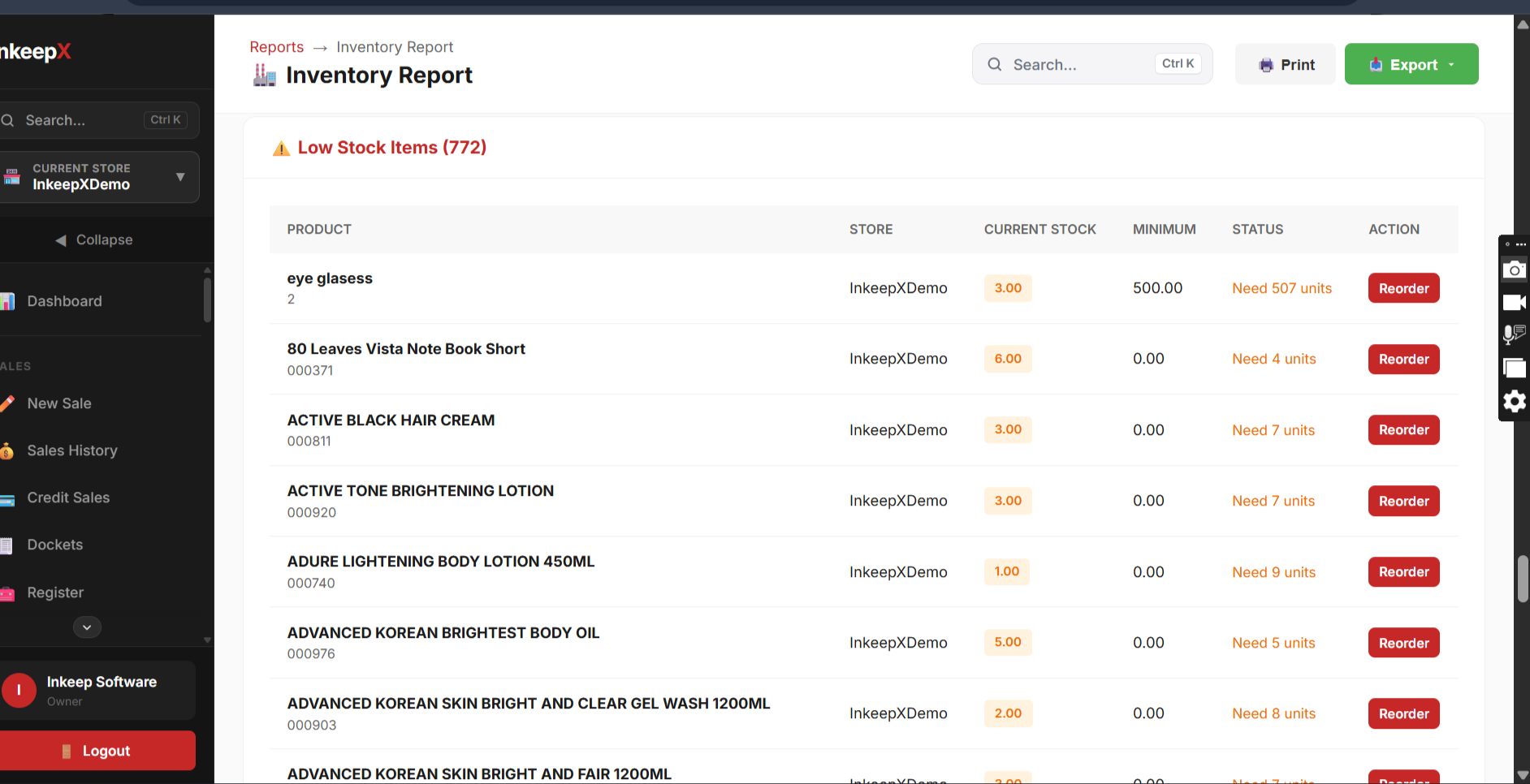
See stock value, best sellers, slow movers and low-stock items, or ask InkeepX AI in plain language.
Everything you need to control stock
From one shop with a single cashier to several branches and a warehouse.
Real-time stock levels
Sales, purchases, returns, transfers and adjustments update quantities as they happen, so the number on screen is the number on the shelf.
Low-stock alerts
Set a minimum quantity per product and see what needs reordering before customers find empty shelves.
Stock reconciliation
Run physical counts, compare them with system stock and identify variances by product and branch.
Stock movement history
A full trail for every product: what came in, what went out, when, where and by whom.
Barcodes and SKUs
Generate and print barcode labels, assign SKUs and scan items at checkout or during counts with compatible scanners.
Variations and units
Manage sizes and colours as variations of one product, and sell by piece, pack, carton or other units.
Purchases and suppliers
Create purchase orders, get approvals, receive stock against them and keep each supplier’s purchase history and balance.
Purchasing in InkeepXWarehouse and transfers
Hold stock centrally, let branches request items, approve transfers and update both locations when goods arrive.
Multi-branch inventory
Switch between stores, see stock by location and compare branches in consolidated reports, all from one account.
Inventory valuation and movers
Know what your stock is worth at cost, which products sell fastest, and which are tying down your money.
Reports and analyticsStaff roles and permissions
Decide who can sell, who can receive stock and who can adjust quantities. Every action is linked to the person who made it.
Bulk import and export
Move from Excel, an exercise book or another system with CSV import, and export your data whenever you need it.
Ask InkeepX AI about your stock
Type questions like “Which products have not sold in 30 days?” or “What should I reorder this week?” and get answers drawn from your own sales and stock records. Treat the answers as insights to guide your decisions, not guarantees.
Keeps selling when the internet drops
Network outages shouldn’t stop your till. The InkeepX offline desktop POS records supported sales on the computer and syncs them to your cloud account once you are back online, so your stock records catch up without manual re-entry.
Offline selling runs on the supported desktop setup. Remote dashboards, the mobile app and online services need an internet connection.
- 1The desktop POS syncs your products and stock while online.
- 2The connection drops.
- 3Cashiers keep searching, scanning and selling, and receipts still print on compatible printers.
- 4Sales are stored safely on the computer.
- 5The internet returns and pending sales sync to the cloud.
- 6Stock, reports and branch totals update for the owner.
Exercise book, Excel or inventory software?
Manual records can work for a very small shop. As products, staff and branches grow, the gaps start costing money.
| What you need | Exercise book | Excel | InkeepX |
|---|---|---|---|
| Stock updates after each sale | Only if someone writes it down | Manual entry, often at day’s end | Automatic from the POS |
| Low-stock warnings | No | Possible with formulas you maintain | Built in, per product |
| Who changed the stock | Rarely recorded | Hard to trace | Linked to each staff account |
| Several branches | Separate books | Separate files to merge | One account, per-branch and combined |
| Check stock away from the shop | No | Only if the file is shared and current | From your phone or laptop |
| Stock value and slow movers | Calculated by hand | Possible with effort | Ready-made reports |
Inventory management for your type of business
Built from a real Nigerian shop floor
InkeepX started with a family retail business run on manual records. As it grew, products expired without anyone noticing and it became hard to tell where the money was going. The problem wasn’t a lack of sales. It was a lack of visibility.
Building inventory software for a pharmacy later showed the same problem in business after business. InkeepX is the system we wished that shop had.
“This app has really helped my business. I can monitor my sales record, inventory, purchases and staff sales from anywhere seamlessly. I also love the feature where my staff can be allowed to access the app as well to make sales.”
Questions about inventory software in Nigeria
What is inventory management software?
Inventory management software keeps a live record of the products a business holds. It updates stock when you buy, sell, transfer or adjust items, alerts you when products run low and shows which items are moving fast or slow.
What is the best inventory management software in Nigeria?
The best choice depends on how you sell. Look for software that connects stock to your POS sales, prices in Naira, handles purchases and suppliers, supports multiple branches and keeps selling when the internet drops. InkeepX was built around these needs for Nigerian retailers, supermarkets, pharmacies, wholesalers and restaurants. The quickest way to decide is to try it free with your own products.
Does InkeepX work without internet?
InkeepX offers an offline desktop POS that keeps recording supported sales when the internet is down, using locally available stock information. Transactions sync to the cloud when the connection returns. Other parts of InkeepX, such as remote dashboards, need internet access.
Can I manage stock across multiple branches?
Yes. InkeepX tracks stock per store and warehouse, records transfers and stock requests between locations, and gives you branch-level and consolidated reports from one account.
Can I import my existing products from Excel?
Yes. You can import products in bulk with a CSV file, including names, SKUs, barcodes, categories, cost and selling prices, quantities and minimum stock levels. Our team can help if your list needs cleaning up first.
How does InkeepX help reduce stock loss?
Every sale, purchase, transfer and adjustment is recorded against the product and the staff member who made it. Physical counts can be reconciled against system stock to show variances. This makes missing stock easier to trace, though no software can stop every loss on its own.
How much does InkeepX cost?
InkeepX has a free plan for getting started. Paid plans add more products, users, branches and reports. See current prices on the pricing page.
Does InkeepX support barcode scanning?
Yes. InkeepX can generate and print barcodes and works with compatible barcode scanners for checkout and stock workflows. Message our team to confirm a specific device before you buy.
Know your stock by this evening
Create your free account, import your products and record your first sale today. If you would rather see it first, we will walk you through InkeepX on WhatsApp.