Inventory Software With a Price Checker: How to Improve Price Accuracy in Retail Stores
A customer picks up a product from your supermarket shelf. The displayed price says ₦2,500, but when the cashier scans it at checkout, the POS system shows ₦2,800.
The customer questions the difference.
Your cashier calls a supervisor. Someone checks the shelf label, another employee searches for the product record, and the queue gets longer.
It may look like a small mistake, but situations like this can affect customer trust, delay checkout, and create unnecessary work for your team.
For supermarkets, pharmacies, provision stores, and other retail businesses in Nigeria, maintaining accurate product prices is an important part of running an organized business.
One way to improve price visibility is to use inventory software with a price checker.
When properly configured with compatible hardware, a price checker allows customers or staff to scan a product barcode and view available product information, including its selling price and, where supported, its image.
However, the device is only part of the solution. Accurate pricing also depends on well-maintained product records, reliable software workflows, and proper synchronization between systems.
In this article, we explain why retail price discrepancies happen, how barcode price checking works, and how to evaluate a solution for your business.
Why Do Shelf Prices and Checkout Prices Sometimes Differ?
Price discrepancies can happen for several reasons. Understanding the cause is the first step towards reducing them.
1. Product Prices Are Updated in Different Places
A business might update the selling price in its POS system but forget to change the corresponding shelf label.
For example, a bottle of cooking oil may increase from ₦4,500 to ₦4,800. If the POS record is updated but the shelf still displays ₦4,500, customers may question the amount charged at checkout.
This problem becomes more difficult to manage when a store has hundreds or thousands of products.
2. Manual Price Updates Are Prone to Errors
Some retailers maintain product information across notebooks, spreadsheets, printed labels, and separate sales systems.
When the same information is entered or updated manually in multiple places, mistakes become more likely.
A staff member might enter the wrong price, overlook a product, or update one record without updating another.
A well-managed inventory system can reduce duplicate record-keeping, although staff still need to enter and verify accurate information.
3. Similar Products Can Be Confused
Products may have similar names, packaging, sizes, or flavours but different prices.
For example, two detergent products may look almost identical, even though one is a smaller pack and the other is a larger pack.
A barcode helps the system distinguish between products when each item has the correct barcode assigned to its product record.
4. Outdated Product Records Create Confusion
A retailer's product catalogue may contain duplicate entries, incorrect barcodes, missing prices, or old product information.
If a cashier or price-checking device retrieves the wrong record, the information displayed may not match the product in the customer's hand.
This is why maintaining accurate product records is just as important as choosing the right hardware.
5. Price Changes Are Not Properly Synchronized
Some retail setups use multiple devices or systems. If these systems do not update at the same time, a price change may appear in one place before it appears elsewhere.
The solution depends on how the software and devices communicate.
Before adopting a price checker, retailers should understand how product updates reach the device, how frequently data is refreshed, and what happens if a connection is interrupted.
How Does a Barcode Price Checker Improve Price Visibility?
A barcode price checker gives customers or staff another way to verify a product's information before checkout.
Instead of searching for a sales attendant, a customer can scan a product at a compatible price-checking station.
When the device is correctly connected to a suitable product-information source, it can display details associated with that barcode.
Depending on the hardware and integration, the information may include:
Product name
Selling price
Product image
Product code or barcode
Other supported product details
Consider a supermarket selling packaged food, beverages, toiletries, and household products.
A customer who wants to confirm the price of a product scans its barcode at the kiosk. The configured system identifies the corresponding product record and displays the available information.
This helps the customer check the price without asking the cashier to interrupt another task.
The key benefit is improved access to product information. Whether the displayed price is correct still depends on the accuracy of the underlying records and the way the device is configured.
Why Accurate Product Records Matter
A barcode price checker cannot fix incorrect product data on its own.
If a product is assigned the wrong selling price in the inventory system, a device displaying that record may show the same incorrect price.
To get the most from a price-checking solution, retailers should establish a reliable process for managing product information.
Maintain One Clearly Defined Product Record
Each product should have the correct name, selling price, and barcode where applicable.
Avoid creating unnecessary duplicate records for the same product. Where products have different sizes, variants, or packaging, make sure they can be identified correctly.
Review Product Prices After Updates
Whenever prices change, staff should follow a defined process for checking the updated records.
If a price checker is connected to the inventory software, test whether the change appears on the device according to the integration's synchronization process.
Do not assume that every device updates instantly.
Check Barcodes Regularly
Incorrect or duplicated barcodes can lead to product-identification problems.
During stock updates or product onboarding, verify that the barcode assigned to each item matches the correct product.
Keep Product Images Organized
If your price-checking setup supports images, use clear images associated with the correct product records.
Images can help customers distinguish between similar-looking products, but only when the image is accurate and the device supports displaying it.
Assign Responsibility for Price Changes
Staff should know who is authorized to update selling prices and who is responsible for checking that changes are reflected in the store's relevant systems.
Clear responsibility helps reduce confusion and makes it easier to investigate discrepancies when they occur.
Benefits of Using Inventory Software With a Price Checker
For a retailer, the value of a price checker is not just the screen or barcode scanner. It is how the feature fits into the store's broader product-management process.
Better Customer Experience
Customers can check available product information more conveniently, reducing the need to ask staff about every price.
Fewer Routine Price Enquiries
A self-service station can handle some basic price enquiries, allowing employees to concentrate on other duties.
Easier Product Identification
Barcodes provide a consistent way to identify products when they are correctly assigned and maintained.
More Organized Price Management
Inventory software can provide a central place to manage product records. When the price-checking integration is correctly configured, it can use the relevant information from that workflow.
Better Visibility Before Checkout
Customers can check a displayed price before reaching the cashier, potentially helping them identify questions earlier in their shopping journey.
These benefits depend on accurate product data, compatible hardware, staff processes, and the reliability of the integration. A price checker should be viewed as part of a broader pricing-control process rather than a complete solution on its own.
What Should Retailers Look for in a Complete Price-Checking Solution?
If you are searching for a price checker for your supermarket, do not evaluate the kiosk in isolation.
Consider the software, product data, hardware, and support you will need to operate the solution.
1. Product and Inventory Management
The software should help you maintain product records and support the inventory workflows your business needs.
Consider whether it also supports sales recording, purchase management, stock monitoring, and useful business reports.
2. Barcode Support
Confirm that the software and intended device support the barcode formats and scanning workflow your store uses.
Ask how the system handles products with missing, duplicated, or unrecognized barcodes.
3. Product Price and Image Display
Find out exactly what the kiosk can display.
Some configurations may show only the product name and price, while others may support product images or additional details.
4. Price Synchronization
Ask how changes to product records reach the device.
Important questions include:
Are updates immediate or periodic?
Does the device store product information locally?
What happens when the network connection is interrupted?
How can staff confirm that a price update has reached the kiosk?
Get clear answers for the specific hardware and integration you intend to use.
5. Hardware Compatibility
Do not assume that every barcode scanner or Android terminal can function as a customer-facing price checker.
Confirm the supported device model, operating requirements, connection method, and any additional software needed.
6. Support and Setup Guidance
Choose a provider that can explain the required setup and help you identify the right configuration for your business.
A clear installation process can save time and reduce the risk of buying unsuitable hardware.
How InkeepX Supports Price Checking for Retail Businesses
InkeepX is a retail and business management platform that helps businesses manage sales, product records, inventory, purchases, staff activities, and business reports.
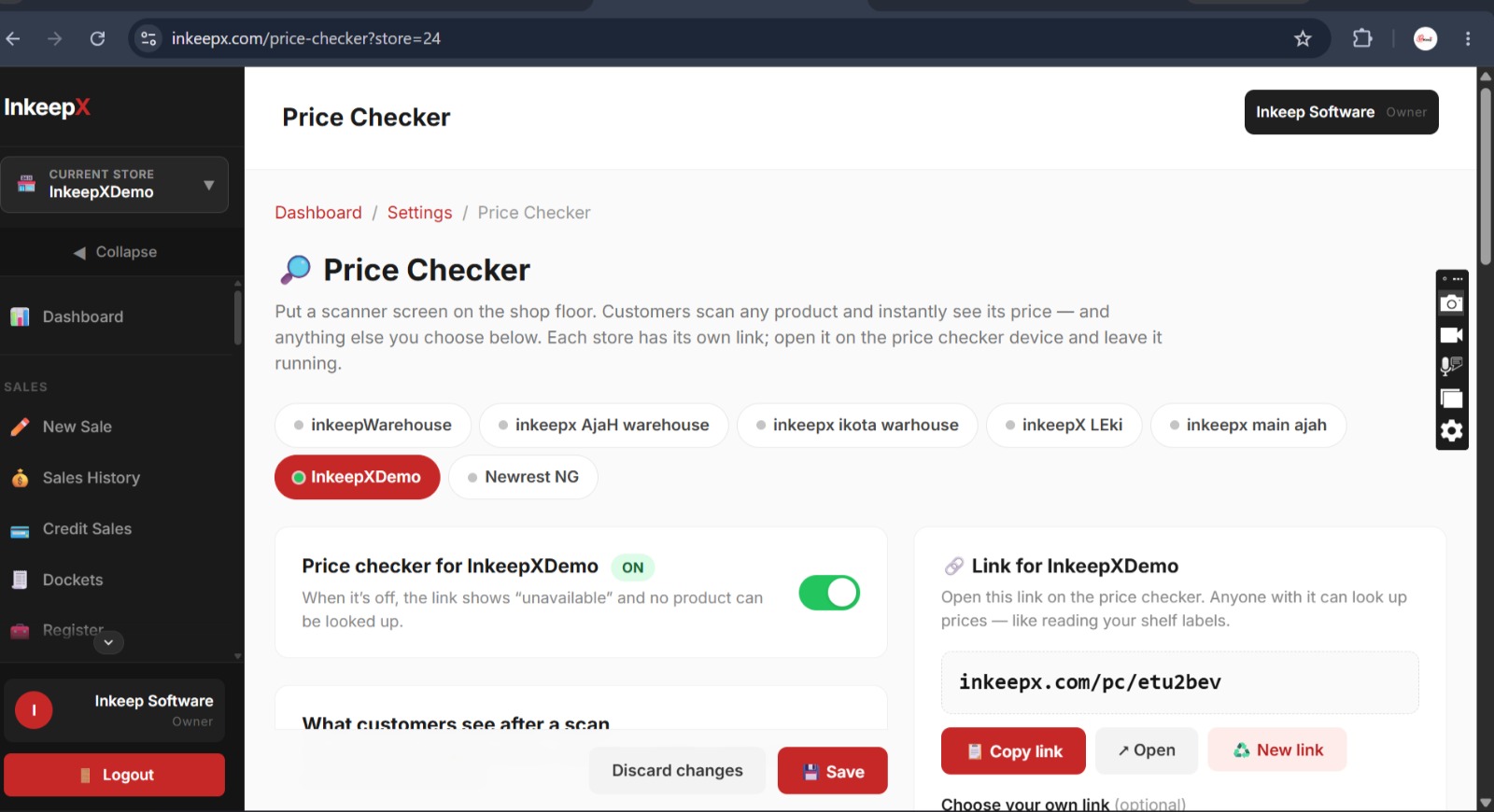
InkeepX also supports a Price Checker feature for compatible hardware.
This gives retailers an additional way to make product information available in their stores while managing their broader retail operations through their inventory software.
Manage Product Information
Accurate product records are essential for reliable price checking. InkeepX helps businesses manage their product catalogue as part of their inventory and sales workflows.
Support Barcode-Based Product Identification
Barcode-based workflows help identify products during retail operations. When the required integration is correctly configured, a compatible price checker can use a barcode to retrieve and display supported product details.
Complement Existing Retail Operations
Rather than treating a price checker as a standalone device, retailers can consider how it fits into their existing product, sales, and inventory processes.
The suitability of a particular setup depends on the device, supported integration, and configuration.
Confirm Your Hardware Before Purchasing
InkeepX does not currently sell price-checker hardware. If you want to use the InkeepX Price Checker feature, you will need to source compatible hardware separately.
Before making a purchase, contact the InkeepX team to confirm whether your intended device is supported and to understand the technical setup requirements.
Contact InkeepX on WhatsApp to discuss compatibility
A Practical Checklist Before You Deploy a Price Checker
Use this checklist to prepare your store.
Review product names and selling prices in your inventory system.
Check that the relevant products have correct barcode records.
Confirm the hardware is compatible with your software.
Verify whether product images are supported.
Understand how price changes synchronize to the device.
Test several products before allowing customers to use the kiosk.
Compare the displayed prices with the intended checkout prices.
Train staff to report and resolve product-data discrepancies.
Establish a process for reviewing prices whenever they change.
Taking these steps can help you avoid common setup issues and make your price-checking workflow more dependable.

Frequently Asked Questions
What is inventory software with a price checker?
It is inventory software that supports a workflow in which a compatible device scans a product barcode and displays available product information, such as its name and price.
Can a price checker eliminate all pricing errors?
No. A price checker can make product information easier to verify, but it cannot automatically correct inaccurate records or guarantee that shelf labels and checkout prices always match. Retailers still need good data-management and price-update processes.
Does a barcode price checker need inventory software?
It needs access to a product-information source that can identify the scanned barcode and provide the relevant details. Inventory software can provide that information when the required integration is supported and configured correctly.
Can a price checker display product images?
Some devices and integrations support product images. Availability depends on the hardware, software connection, and whether the relevant images are maintained in the product records.
Does InkeepX sell price-checker machines?
No. InkeepX supports a Price Checker feature for compatible hardware, but does not currently sell the hardware itself. Contact the team to confirm compatibility and setup requirements before buying a device.
Is a price checker suitable for a small retail shop?
It may be, depending on the number of products you sell, how frequently customers ask for prices, your store layout, and the cost of sourcing and configuring compatible hardware.
Final Thoughts
Accurate pricing is important for customer trust and efficient retail operations.
When shelf labels, product records, and checkout prices do not match, customers may become frustrated and staff may spend valuable time investigating discrepancies.
Inventory software with a price checker can help make product information easier to access, especially when barcode identification, product records, and device integration are managed properly.
For retailers in Nigeria, the best solution is not necessarily the device with the biggest screen or the lowest price. It is a compatible setup that fits the store's workflow and works alongside reliable inventory and pricing processes.
InkeepX supports a Price Checker feature for compatible hardware, alongside its broader inventory and sales management capabilities.
Want to find out whether your store can use InkeepX Price Checker?
Contact the InkeepX team to discuss your business requirements and confirm compatible hardware and setup options before purchasing a device.
Visit www.inkeepx.com to learn more about InkeepX.