How to Use a Price Checker With Inventory Software in Nigeria
Imagine a customer shopping in your supermarket. They pick up a product but cannot find its price on the shelf. They look around for a staff member, but everyone is busy serving other customers.
The customer has two options: wait for assistance or leave the product behind.
Now imagine that the customer can simply scan the product's barcode at a price-checking station and view its price on a screen.
That is the convenience a price checker can offer.
For supermarkets, provision stores, pharmacies, and other retail businesses in Nigeria, a price checker can make it easier for customers to confirm product prices without interrupting staff.
However, the device is only one part of the solution. To display useful and accurate product information, it needs to work with a system that maintains the store's product records.
This is where inventory software with price checker support becomes valuable.
In this guide, we'll explain how the technology works, what you need to set it up, and how InkeepX can support your store's product-information management.
What Is a Price Checker?
A price checker is a device or terminal that allows customers or staff to scan a product's barcode and view its information on a screen.
Depending on the device and software configuration, the information displayed may include:
Product name
Selling price
Product image
Barcode or product code
Other available product details
Price checkers are particularly useful in supermarkets and retail stores where customers may need to confirm the prices of many different products.
For example, a customer shopping for beverages, toiletries, packaged food, or household items can scan a product instead of asking a cashier to check its price.
A price checker does not replace your POS system. Instead, it complements your existing retail operations by making product information easier to access.
What Is Inventory Software With Price Checker Support?
Inventory software helps a business manage products, stock quantities, purchases, sales, and other inventory-related records.
When the software supports integration with a compatible price checker, product records can be used to display information on the price-checking device.
The basic idea is straightforward:
Your business records its products in the inventory software.
Each product has a barcode or product code that can be identified by the system.
A compatible price-checking device scans the barcode.
When the device is correctly connected and configured, it retrieves or displays the corresponding product information.
The customer can view the available details on the screen.
The exact process depends on the hardware, software integration, and configuration.
The important point is that a price checker needs access to the correct product information. A scanner alone cannot determine the selling price of a product unless it is connected to a system or data source that provides that information.
How Does a Price Checker Work With Inventory Software?
Let's use a supermarket as an example.
Suppose your store sells bottled water, soft drinks, biscuits, detergent, and other household products.
You already manage these products in your inventory software. Each product has a name, selling price, and barcode where applicable.
When a customer scans a bottle of water at a compatible price checker, the device identifies the barcode and uses the configured connection to retrieve the relevant product information.
The screen can then display the product's name and price, and may also show its image if that information is supported and configured.
<text>Example of a price-checking workflow</text>
Product record → Barcode scan → Software or connected data source → Product information displayed
For this workflow to function correctly, the device must be compatible with the software integration, and the product's barcode and details must be properly recorded.
What Happens When a Product's Price Changes?
Imagine that your store changes the selling price of a product.
Your staff updates the product record in the inventory system. Whether the price checker reflects that change immediately depends on how the device is connected and how its data is synchronized.
With a correctly configured integration, the price checker can display the updated price according to the integration's refresh or synchronization process.
This is why businesses should confirm how price updates work before purchasing or configuring a price-checking device.
You want a setup that helps reduce the risk of customers seeing outdated prices.
Why Supermarkets in Nigeria Should Consider a Price Checker
For Nigerian retailers, a price checker can help improve the shopping experience and reduce the number of routine price enquiries staff need to handle.
Here are some of the potential benefits.
1. Customers Can Check Prices More Easily
Customers may want to confirm a product's price before deciding whether to buy it.
A price checker gives them another way to access that information without having to find a cashier or sales attendant.
This can be especially useful in busy supermarkets where staff members are handling multiple tasks.
2. Staff Can Spend More Time Serving Customers
When staff members repeatedly leave their duties to answer price enquiries, other tasks may be delayed.
A self-service price-checking station can handle some of these routine questions, allowing employees to focus on customer service, shelf arrangement, stock replenishment, and checkout operations.
The actual time saved will depend on your store's size, customer traffic, and how frequently customers use the device.
3. Product Information Becomes Easier to Access
A barcode price checker can make product details available at a designated point in the store.
Where supported, displaying product images alongside names and prices can also help customers identify the product they scanned.
This can be useful in stores with large product catalogues or similar-looking products.
4. It Can Support Better Price Transparency
Customers are more comfortable when they can confirm a product's price before reaching the checkout counter.
A price checker can support this transparency by providing another way to verify listed prices.
However, the device should be properly configured, and product records should be maintained regularly. A price checker cannot correct inaccurate information in the underlying system by itself.
5. It Complements Your Existing POS and Inventory System
Your POS system handles sales transactions, while your inventory software helps maintain product and stock records.
A compatible price checker adds another way for customers or staff to access product information.
Together, these tools can support a more organized retail operation, provided they are configured to work together correctly.
What Do You Need to Set Up a Price Checker in Your Store?
Before purchasing a device or starting an installation, consider the following requirements.
1. Inventory Software With the Required Support
Start by confirming that your inventory software supports the price-checker workflow you want to use.
Not every inventory system works with every price-checking device. Ask the software provider about supported hardware, integration methods, and setup requirements.
2. Compatible Price-Checker Hardware
You will need a suitable device, such as a price-checking terminal or kiosk with a barcode scanner and display.
The hardware must support the required connection to your inventory software or its associated data source.
Important: InkeepX does not currently sell price-checker hardware. Businesses interested in using this feature need to source compatible hardware separately and confirm compatibility and setup requirements with the InkeepX team before making a purchase.
3. Correct Product Records
Your inventory records should contain accurate product names, selling prices, and barcode information.
If you want product images to appear, the relevant images must also be available and supported by the integration.
Review your product catalogue before deployment to identify missing barcodes, duplicate records, incorrect prices, or incomplete product information.
4. A Confirmed Connection and Setup Process
The hardware and software need to be configured to communicate correctly.
Depending on the device, setup may involve software configuration, a supported integration, network settings, or other technical steps.
Do not assume that every price checker will work simply by connecting it to a computer or network. Confirm the requirements for your specific device first.
5. Testing Before Customers Use It
Before making the price checker available to customers, test several products.
Check that:
The barcode identifies the correct product.
The displayed price matches the intended selling price.
Product names are correct and readable.
Product images appear where supported.
Price changes are reflected according to the configured synchronization process.
Products with missing or unrecognized barcodes are handled appropriately.
Testing helps you identify configuration and data problems before they affect the shopping experience.
How InkeepX Supports Price Checking
InkeepX is a business management platform designed to help Nigerian businesses manage sales, inventory, purchases, and other retail operations.
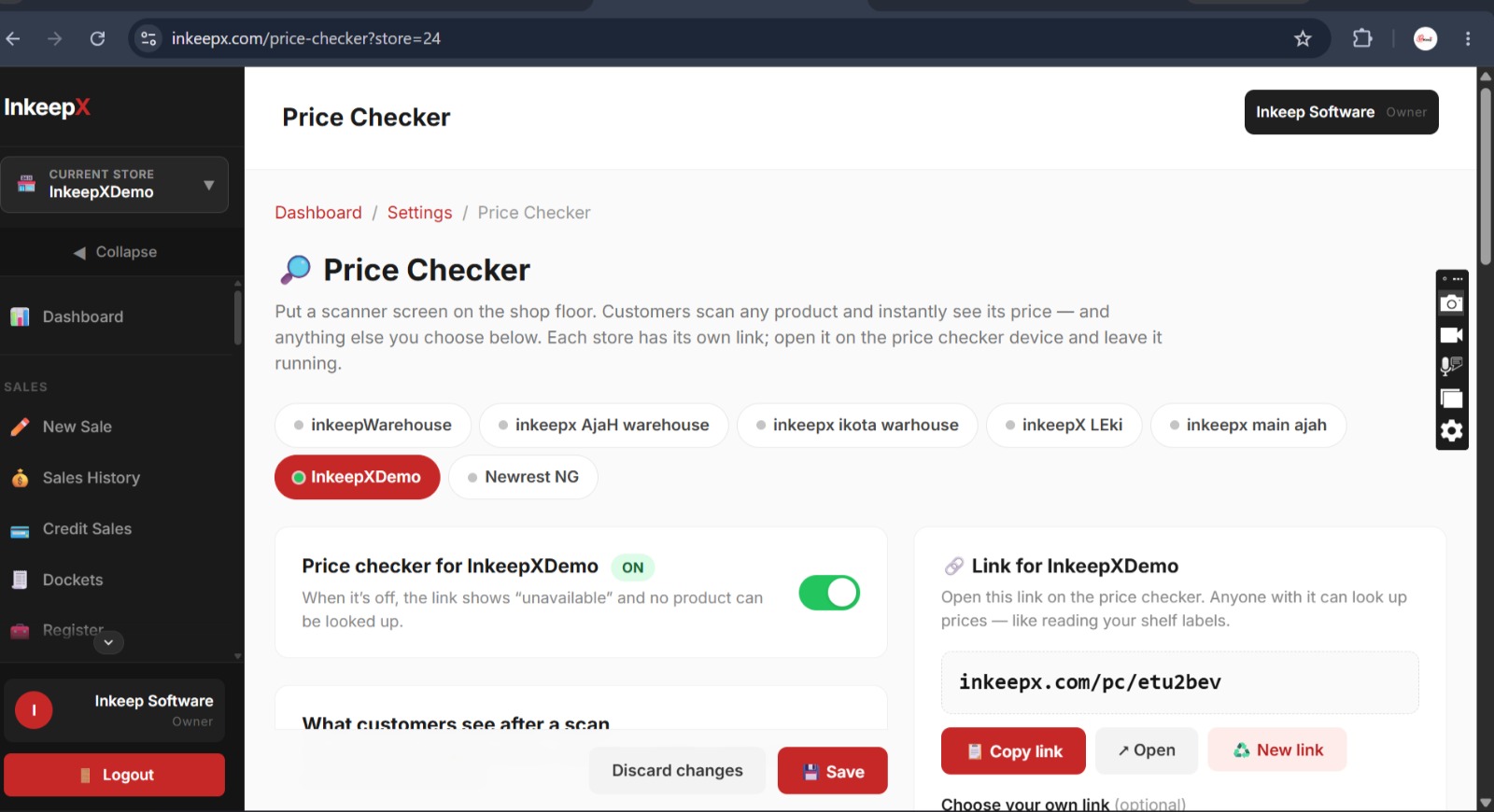
In addition to its core inventory and POS capabilities, InkeepX supports a Price Checker feature for compatible hardware.
This gives retailers another way to make product information accessible within their store environment.
Manage Product Information in One System
Your product records are an important part of the price-checking process.
With InkeepX, businesses can manage their product catalogue and related inventory operations. Accurate product records help provide the information needed for supported price-checking workflows.
Support Barcode-Based Retail Operations
Barcodes make it easier to identify products during retail operations.
When the required barcode and price-checker integration are correctly configured, a compatible device can use the barcode to identify the relevant product and display supported details.
Complement Your POS and Inventory Workflow
A price checker is most useful when it fits into the way your store already operates.
InkeepX helps businesses manage sales, stock, and product information, while the supported Price Checker feature extends product-information access to compatible devices.
The exact capabilities available will depend on the hardware and integration used.
Confirm Hardware Compatibility Before You Buy
Because price-checker devices differ in their specifications and integration requirements, it is important to confirm that a particular model can work with InkeepX.
InkeepX does not currently supply the hardware itself. Our team can help you understand the feature and confirm the relevant technical requirements before you proceed.
Interested in using InkeepX Price Checker? Contact our team to discuss your store's needs and confirm the supported hardware and setup process.
Which Businesses Can Benefit From a Price Checker?
A price checker may be useful for different types of retail businesses, depending on their product range, customer traffic, and store layout.
Supermarkets
Supermarkets often stock many products across food, drinks, toiletries, cleaning products, and household categories. A price checker can help customers verify prices without asking staff for every item.
Provision and Grocery Stores
Larger provision stores with a broad product catalogue may benefit from making prices easier to check, especially when products are arranged across multiple shelves.
Pharmacies
Pharmacies may use barcode-based price checking to help customers confirm prices for products where this workflow is appropriate. Product records and applicable regulatory requirements should be handled carefully.
Cosmetics and Personal Care Stores
Stores selling similar products in different sizes, types, or packaging may find barcode-based identification helpful, provided each product is recorded correctly.
Electronics and General Retail Stores
Electronics and general merchandise retailers may also benefit from making product information accessible at a designated checking point.
The best use case depends on your store's operations and whether compatible hardware is available for your required workflow.
Common Mistakes to Avoid When Setting Up a Price Checker
A price checker can only be as reliable as its product data and configuration. Avoid these common mistakes.
Using Hardware Without Confirming Compatibility
A device may have a barcode scanner and screen but still lack the integration required to work with your inventory software.
Confirm compatibility with your software provider before purchasing the hardware.
Leaving Product Prices Out of Date
If your product records are incorrect or the price checker is not synchronizing as expected, customers may see misleading information.
Establish a process for updating product prices and verifying that the changes appear correctly on the device.
Ignoring Barcode Errors
Missing, incorrect, or duplicated barcodes can cause products to be misidentified or not found.
Review your product catalogue and test barcode scanning during setup.
Assuming Every Device Displays Product Images
Some devices or integrations may support product names and prices without supporting images or other additional details.
Confirm the exact information your intended hardware and integration can display.
Skipping Staff Training
Even when customers use the price checker themselves, staff should know how it works, how to report errors, and whom to contact if a product is not recognized.
A short training session can help your team identify issues and keep the device useful.
Price Checker vs. POS System: What Is the Difference?
A price checker and a POS system serve different purposes.
| Feature | Price Checker | POS System |
|---|---|---|
| Main purpose | Lets users check product information | Records and processes sales |
| Barcode scanning | Identifies a product for checking | Can identify products during checkout |
| Product prices | Displays supported product-price information | Uses prices to process sales |
| Payments | Not normally designed to process payments | Can support payment recording and checkout workflows |
| Inventory management | Depends on its connection to an inventory system | May be integrated with inventory management |
| Typical users | Customers or store staff | Cashiers and sales staff |
A price checker is not a replacement for your POS or inventory software. It is an additional tool that can work alongside a suitable system.
For retailers who want to manage product records, stock, purchases, and sales while exploring barcode-based price checking, it is important to choose software that supports the required workflow.
How to Choose the Right Inventory Software for Your Store
If you are considering a price checker, do not choose your inventory software based on that feature alone.
Look at the overall needs of your business.
Consider whether the software can help you:
Maintain accurate product records.
Record sales and purchases.
Monitor stock quantities.
Review sales and business reports.
Manage staff access and permissions.
Support the number of branches or stores you operate.
Work with the barcode scanners, printers, and other devices your business needs.
Confirm compatibility with the specific price-checker hardware you intend to use.
Also ask the provider how product updates reach the price checker, what happens when the connection is interrupted, and which setup steps are required.
These questions can help you avoid investing in hardware that does not fit your existing retail system.
Frequently Asked Questions
Can I use a price checker with inventory software in Nigeria?
Yes, provided your inventory software supports the required integration and the price-checking hardware is compatible. You should confirm both requirements before purchasing a device.
Does InkeepX support a price checker?
Yes. InkeepX supports a Price Checker feature for compatible hardware. The specific device and configuration should be confirmed with the InkeepX team.
Does InkeepX sell price-checker machines?
No. InkeepX does not currently sell the price-checker hardware. Businesses must source compatible hardware separately and confirm the device's compatibility and setup requirements before purchasing.
Can a price checker display product images?
Some price-checking setups support product images alongside product names and prices. Image display depends on the device, software integration, and whether the relevant product images are available and configured.
Will a price checker automatically update when I change a product's price?
That depends on the integration and its synchronization process. Confirm how price changes are transferred to the device and test the workflow before using it with customers.
Can I use any barcode scanner as a price checker?
Not necessarily. A basic barcode scanner may only send barcode data to a connected computer or application. A customer-facing price checker requires a compatible display and a working connection to the product-information source.
Is a price checker useful for a small shop?
It can be useful if your store has enough product variety or price enquiries to justify the setup. Consider your customer traffic, available space, hardware cost, and compatibility before investing.
Final Thoughts
A price checker can make it easier for customers to confirm product prices and access product information without waiting for assistance.
But the device alone is not enough. You need accurate product records, suitable inventory software, compatible hardware, and a properly configured connection.
For supermarkets and retailers in Nigeria, choosing inventory software with price checker support can be one step towards a more organized and customer-friendly retail operation.
InkeepX supports a Price Checker feature for compatible hardware, alongside its broader sales and inventory management capabilities. Since InkeepX does not currently sell the hardware, contact the team to confirm compatibility and the setup requirements for your intended device.
Ready to Explore InkeepX Price Checker?
Want to make product information easier to access in your store?
Contact InkeepX to learn more about the Price Checker feature, discuss your inventory management needs, and confirm which hardware and setup requirements apply to your business.
Visit www.inkeepx.com to learn more about InkeepX.